Fing keeps your scan in the cloud. Subnetlens keeps it on your machine.
Fing is polished and its device recognition is genuinely strong. It also runs on a Fing account, mirrors your network to its cloud, and puts the useful monitoring behind a subscription. Subnetlens is local-first: no account, no cloud, no telemetry, and a one-time price. One free scan classifies every device; Pro adds monitoring and reports without a subscription.
Polished device names, but the results sync to a cloud account and the monitoring sits behind a subscription.
Fing is a polished product.
Its device database is excellent and it spans phone, desktop, and web. The decision is simpler than that: do you want a cloud account and a subscription, or everything local and paid once?
Keep Fing when...
You want mobile, desktop, and web in sync, and its crowdsourced device naming is your priority.
- You want cross-device cloud sync.
- A subscription and account are fine.
- You scan from your phone too.
Use Subnetlens when...
The device list has to become evidence: ports, versions, topology, changes, notes, screenshots, risk, and client-ready output.
- You manage office, lab, or client networks.
- You need to explain what changed between scans.
- You want local data, no cloud account, and a tool you own.
Everything, and it stays on your machine.
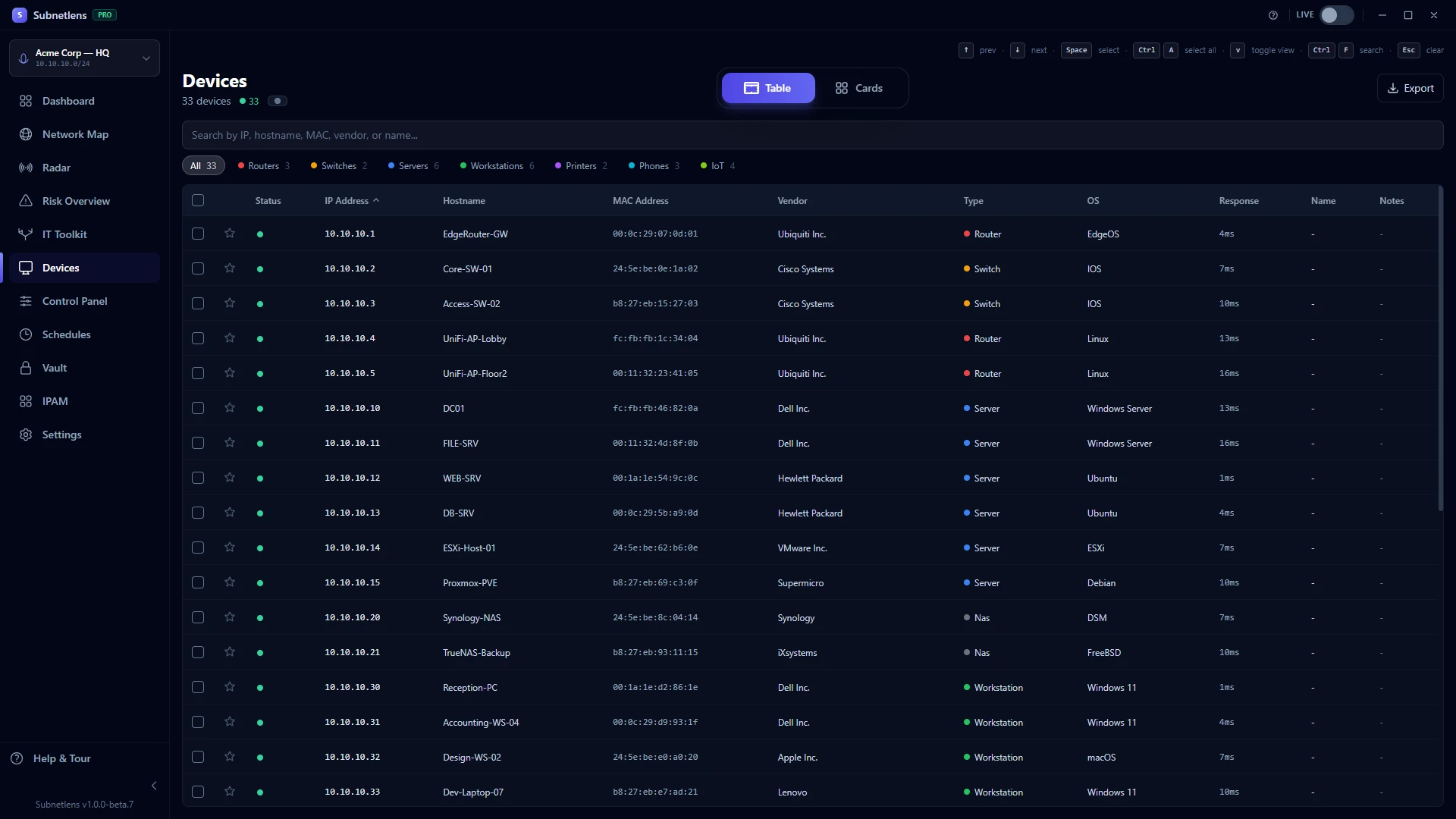
Fing names devices well, in its cloud. Subnetlens classifies them locally, keeps the result on your machine, and never asks for an account.
The important part is not the count. It is the context around every device: open services, version hints, OS hints, device type, confidence, and why Subnetlens classified it that way. On that same test /24, one scan named 4 SQL Server instances (3 on an end-of-life 2008 build), 25 RDP endpoints, and a dozen FTP devices across printers, switches, and a router. Fing would have named those devices well, that is its strength, but it would not have flagged the end-of-life database software, and the result would live in a Fing account rather than only on your machine. That context becomes the baseline for the next scan.
Built for the messy middle of real admin work.
Finding IPs is one small step. Subnetlens is designed for what happens after: investigation, documentation, monitoring, and handoff.
Device identity with evidence
Router, NAS, printer, camera, workstation, phone, IoT, and more, with a confidence score and signals behind the call.
Topology and inventory
Turn scan output into a visual map and searchable inventory instead of keeping a mental picture of the network.
Live Mode and port history
See mDNS/SSDP activity and track which ports appeared or disappeared since your baseline.
Control Panel + 26 IT tools
Ping, traceroute, DNS, MTR, whois, netstat, TLS checks, SMB browser, per-device notes, and device-focused workflows in one place.
Local-first vault
Keep credentials encrypted locally. Scan data stays on the machine by default, with no account and no cloud sync.
Reports, integrations, custom builds
Create white-label PDFs, export evidence, push webhooks, expose Prometheus metrics, or ask for a tailored/white-label build.
This is not a thin scanner with a nicer coat.
The product is a Windows desktop workbench. These are real Subnetlens screens from the current landing demo reel.
Map the network
Move from a flat list into a topology view that makes device relationships easier to explain.
See what changed
Radar gives you a timeline for network events and changes between scans.
Investigate one device
Open a device and work from a focused control panel instead of jumping between tools.
Keep sensitive notes local
The vault and scan database are designed around local ownership, not another SaaS account.
Same starting point. Very different finish line.
Discovery is only the shared starting point. The gap is what happens after: IPAM, Port Watch, secure local vaults, device history, reports, integrations, and the rare ability to have the app shaped around your workflow.
| Need | Fing Desktop | Subnetlens Free | Subnetlens Pro |
|---|---|---|---|
| Find live devices | Yes | Yes | Yes |
| Device identification | Excellent, cloud database | Type + confidence, local | Classification with history |
| Ports and service versions | Basic | Top 100 TCP ports + 11 protocols | Expanded |
| Runs without an account | No, needs a Fing account | Yes, no account | Yes |
| Where your scan data lives | Fing cloud plus your devices | Only on your machine | Only on your machine |
| Continuous monitoring | Paid subscription | Scan history kept | Live Mode, Radar, one-time |
| Watch specific ports across scans | Ad hoc port scan per device | No | Port Watch: per device or network-wide, with per-port states |
| Reports and white-label output | Cloud / subscription | Export data | Local white-label PDF |
| IPAM, SNMP, encrypted local vault | No | No | Yes, local |
| Prometheus /metrics for Grafana | No | No | Yes |
| Custom or white-label build | Not offered | Ask us | Available and encouraged |
| Platform | Windows, Mac, iOS, Android, web | Windows only | |
| Business model | Free tier plus subscription | Free forever | One-time from $79, no subscription |
The parts Fing keeps in the cloud.
After the direct comparison, these are the bonus reasons Subnetlens becomes a workbench: IP planning, local secrets, evidence, and custom builds around your team.
Track IP ranges, device ownership, and network inventory instead of treating every scan as a disposable list.
Keep credentials and sensitive device notes encrypted locally, next to the machine they belong to.
Turn scan findings into a baseline, a timeline, and a client-ready explanation instead of another CSV.
Need your reports, your RMM, your hardware naming, or a white-label version? Subnetlens can be adapted.
Try it free. Own Pro if it earns its place.
The free tier is enough to compare scan quality today. Pro is a perpetual license, not a subscription.
- All Pro workflows unlocked
- 1 year of updates included
- Good for solo admins and labs
- Best fit for small IT teams
- Reports, Radar, vault, scheduler
- Room for multiple admin machines
- For MSPs and client-heavy teams
- Custom requests can be scoped
- White-label builds available
Every Pro plan includes a 7-day trial inside the app and a 14-day money-back guarantee.
Questions before replacing your scanner?
Is this really free to try?
Yes. Download Subnetlens Free, scan your own network, and compare it against your current Fing Desktop workflow. No account, no payment, and no cloud setup. The 7-day Pro trial starts inside the app with one click, no card.
Does Subnetlens replace Fing Desktop completely?
It depends. Fing has an excellent cloud device database and spans mobile, desktop, and web, so if you want cross-device sync and are comfortable with an account, keep it. If you need scan data to stay on your machine with no account, a one-time price instead of a subscription, and local reports, Subnetlens is the better fit.
Does it send network data to Subnetlens servers?
No. Scan results, device inventory, maps, notes, and vault data stay on your machine. The only external communication is download/referral analytics on the website and license activation if you enter a Pro key.
What about SmartScreen and trust?
The installer is code-signed by HELIOSOFT LTD, a UK limited company. New Windows desktop apps still need to build SmartScreen reputation over time, so some users may see a first-run prompt on new releases. The download page publishes the SHA-256 hash for verification.
Can you build a version for my MSP or team?
Yes. Custom features, tailored reports, internal integrations, and white-label builds can be scoped. If the off-the-shelf product is close but not exact, contact us and describe the workflow.
Put both tools on the same network.
Run Fing Desktop. Run Subnetlens Free. If a cloud account and a subscription do not bother you, keep your current workflow. If you would rather keep everything local and pay once, Pro is waiting inside the app.
Download Subnetlens Free