Find every device on your network in seconds and know what each one is: 1,451 recognition patterns, 26 diagnostic tools, and a live topology map, all running on your PC with a code-signed installer. Free forever, and Pro is one payment.
Optional, for the security-conscious: run Get-FileHash Subnetlens-Setup-1.2.3.exe in PowerShell. If the result matches the value above, your copy is authentic and untampered.
0
IT Tools
0
Device Patterns
0
Classifier Signals
0
Pages
Interactive demo — click any menu item to explore the app
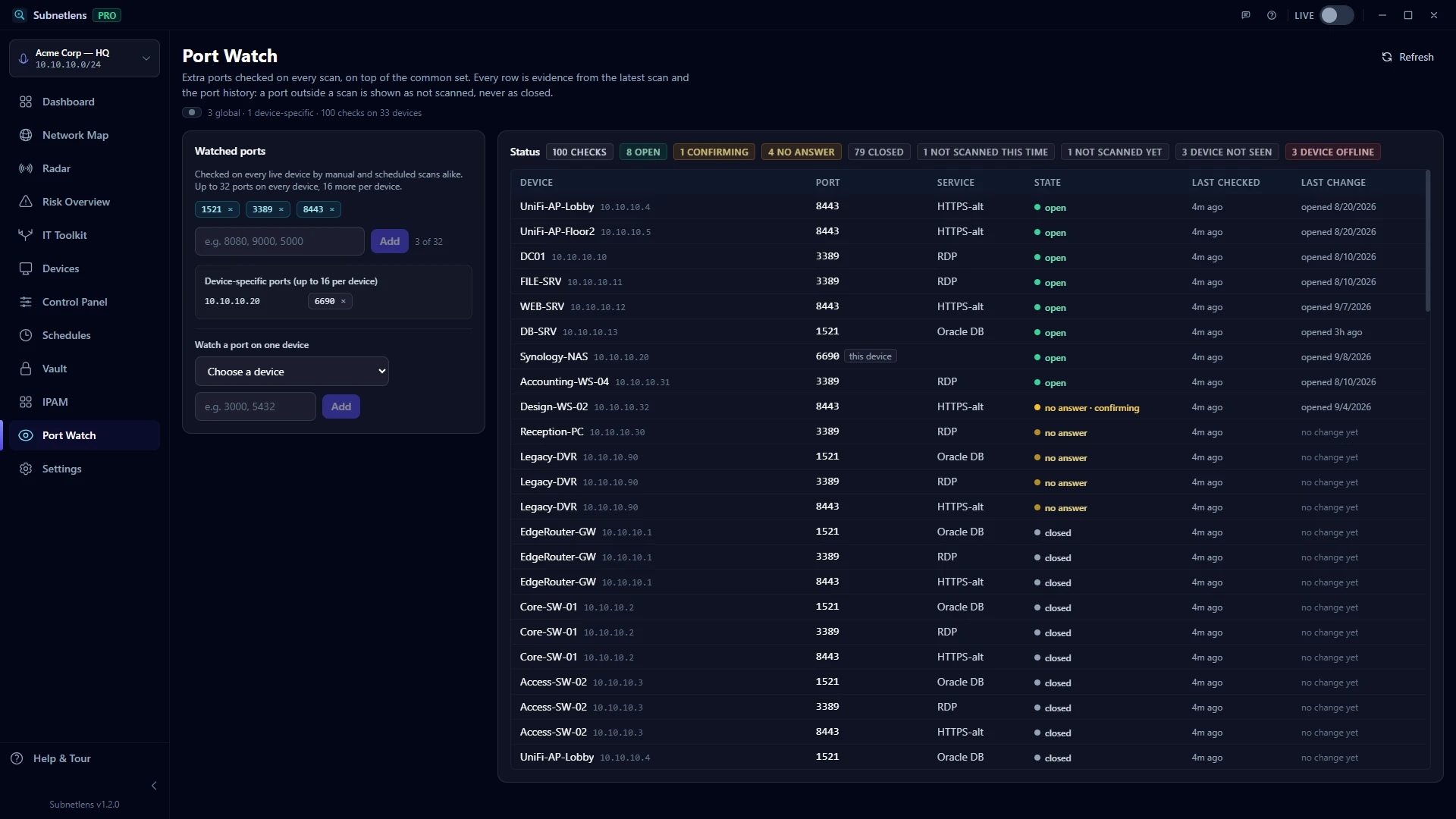
338984435432watched on every device · 45 common ports plus 3 watched per scan
DC01
192.168.1.10 · domain controller
3389OPEN2 min ago
WEB01
192.168.1.20 · web server
8443NO ANSWER · CONFIRMING2 min ago
NAS01
192.168.1.42 · Synology
5432CLOSED2 min ago
PRN-2F
192.168.1.61 · printer
8443NOT SCANNED YETnot yet
LT-JDOE
192.168.1.113 · laptop
3389DEVICE NOT SEEN1 h ago
Credential Vault — AES-256-GCM
DC01 — admin
192.168.1.10 · last used 2 hours ago
●●●●●●●●●●●
NAS01 — root SSH
192.168.1.42 · used 12 times
●●●●●●●●●●●
Switch core — SNMPv3
192.168.1.2 · auto-filled in Map
●●●●●●●●●●●
Scan complete — 12 devices found in 3.8s
26 tools
Built-in toolkit
1,451
Device patterns
100% local
No telemetry, no cloud
From $79
One-time, perpetual
Power features
Built for IT pros, not marketing teams
No dashboards that need a PhD. No monthly bills. Just a fast, capable tool that stays out of your way.
PRO
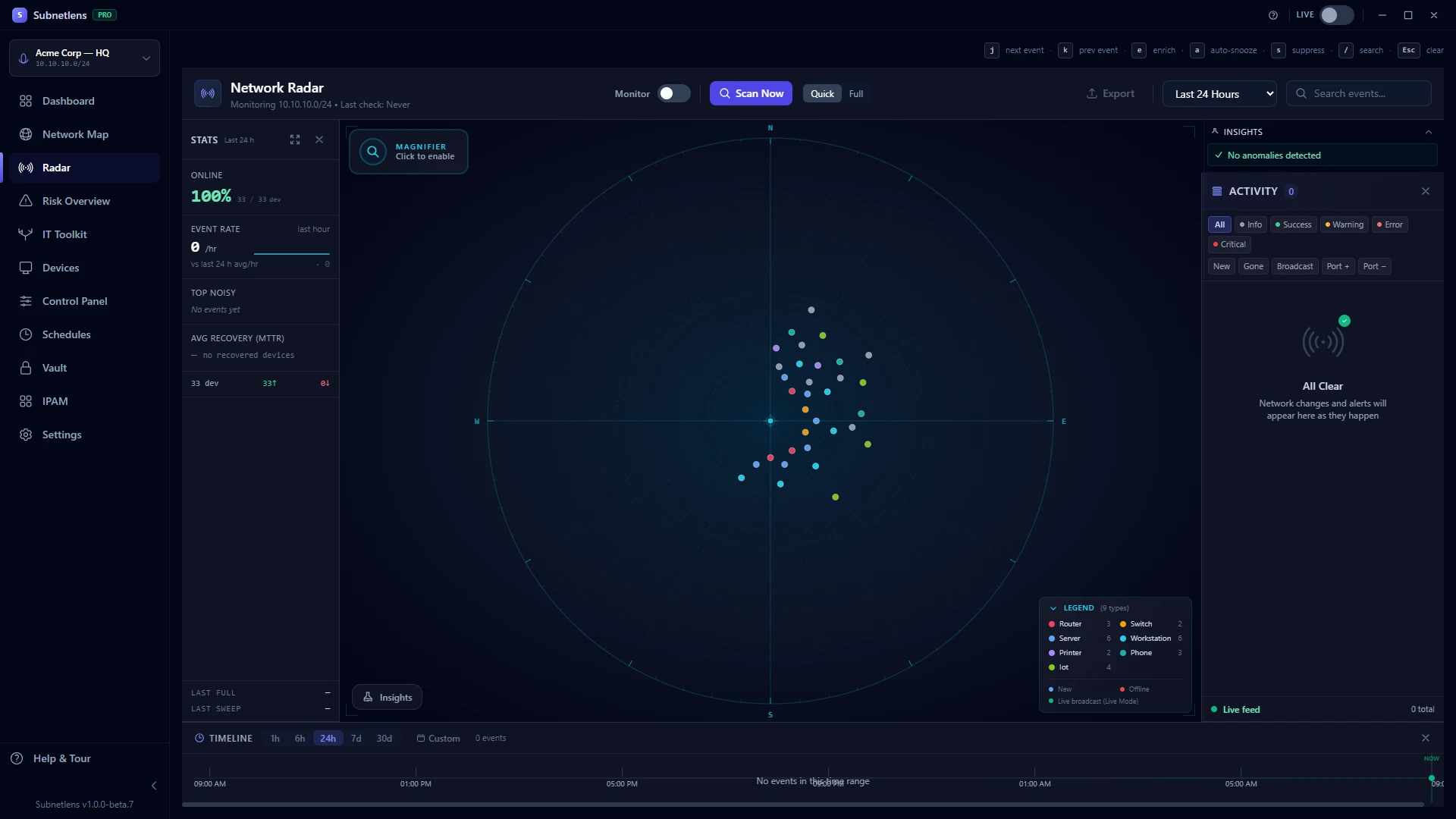
Network Radar
Real-time event timeline + tactical-radar canvas. Sees new devices, disappeared devices, port changes, hostname changes. Magnifying-glass cursor lens for precise clicks. Anomaly detection surfaces noteworthy events automatically.
in: Radar page
PRO
Live Mode
Toggle the REC indicator in the header. Continuous mDNS + SSDP listeners catch every device the moment it broadcasts — even between scans. Devices pulse with a soft halo when they speak up.
in: Header toggle
PRO
Per-device port history
Every scan records which ports opened or closed. Timeline view per device, with "NEW since baseline" badges when a port appears that wasn't there before. Security-grade visibility no consumer scanner offers.
in: Devices → details panel → Explorer
PRO
Port Watch
Tell the scanner which extra ports matter, on every device or on one, and see each of them after every scan as open, closed, no answer or not scanned yet, with when it was last checked and when it last changed. A port outside a scan is never called closed. Every open or close also lands in Radar and the port history.
in: Port Watch page, Settings → Network
PRO
Device insights + deep scans
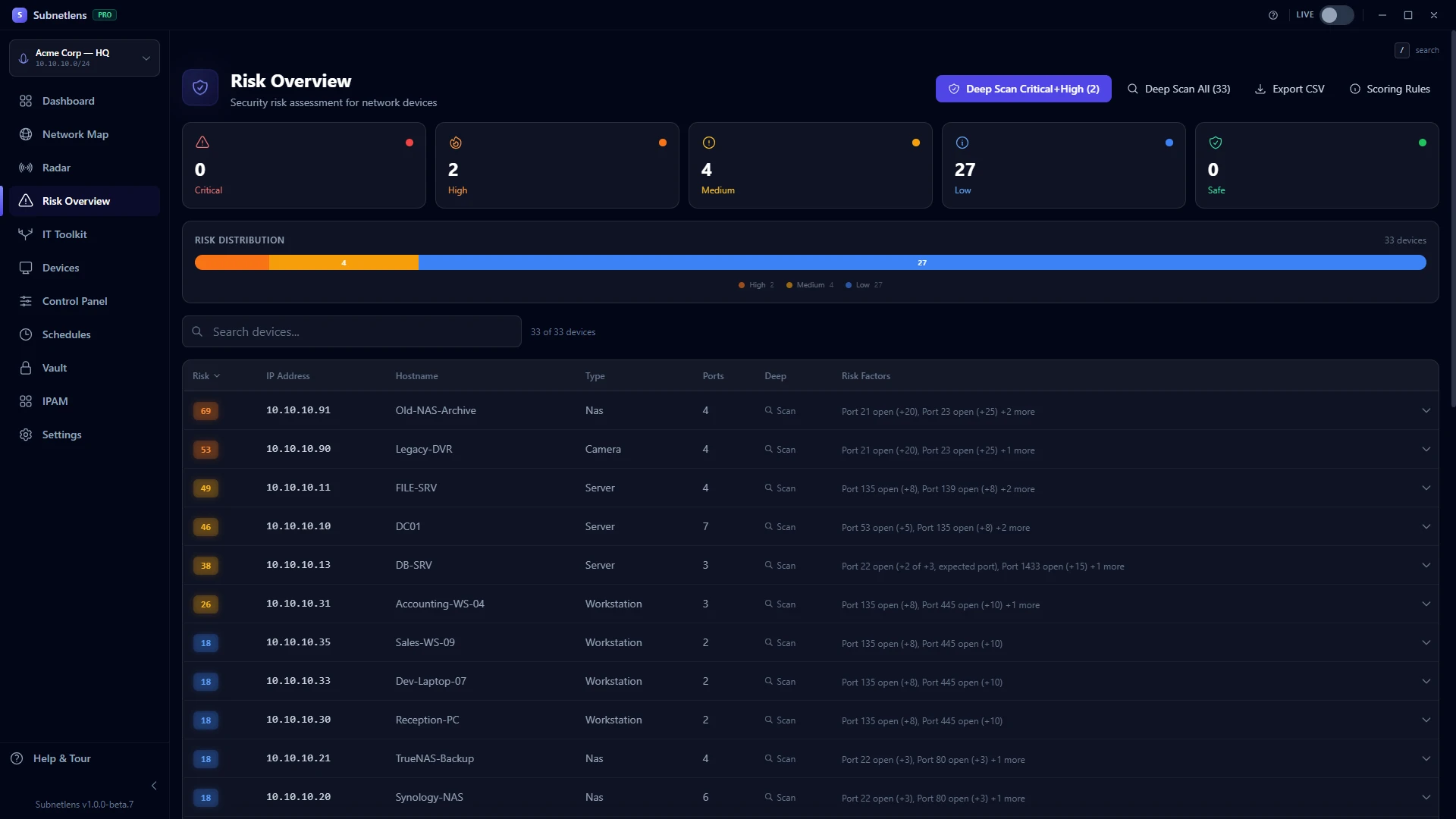
Per-device 0–100 score. One-click device deep-dive: TLS configuration, HTTP header review, SSH exposure/banner analysis, and limited banner-based matching against eight known CVE patterns. No credential authentication or vulnerability verification. Exports to CSV / JSON for review and reporting.
in: Risk page
PRO
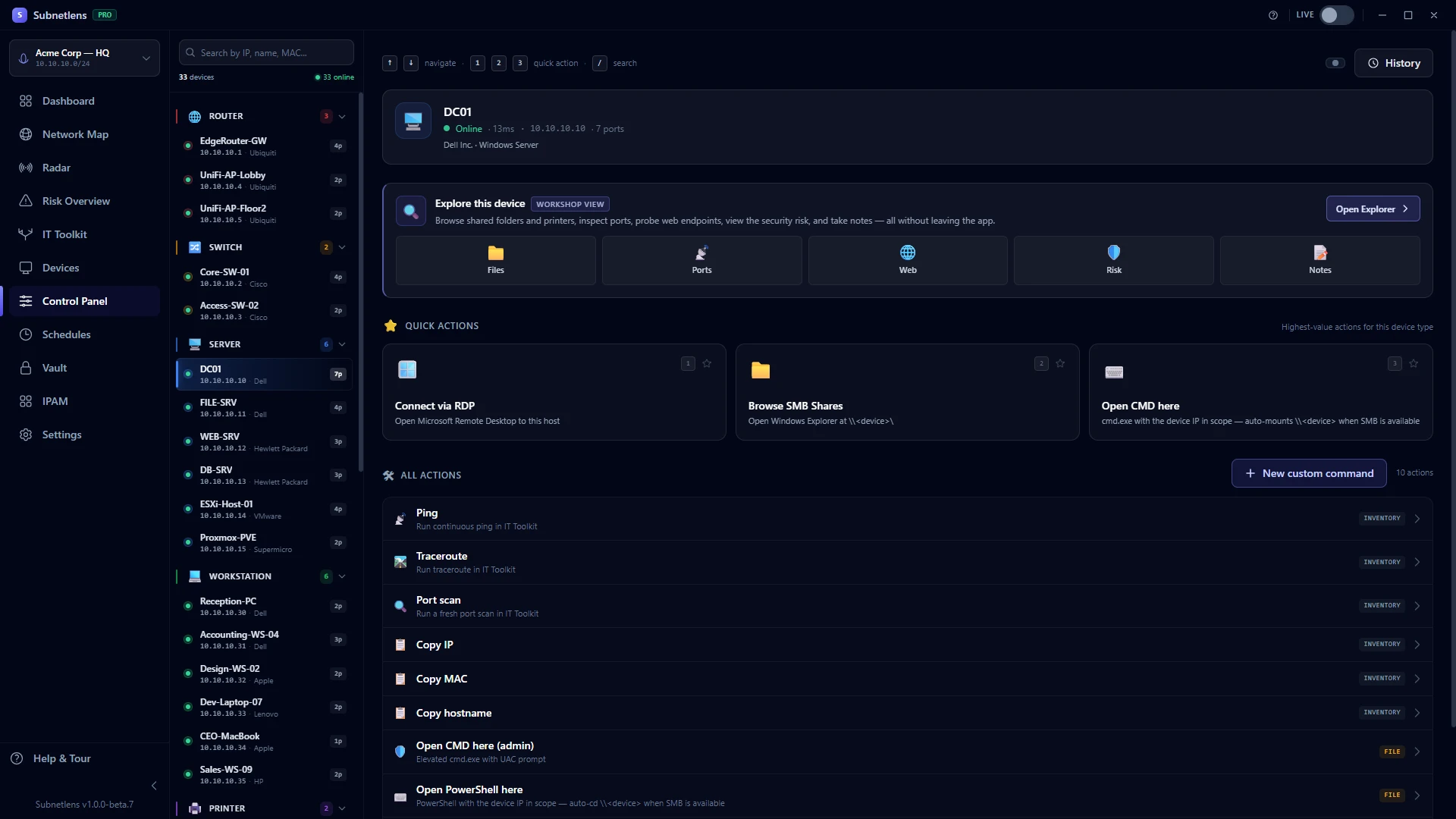
Control Panel + Explorer
Pick a device, see context-aware actions: RDP / SSH / CMD here (with in-app credential modal + Vault auto-fill), camera streams, SNMP reboots, DB connection strings, IPP test-page print. Click any tile on the Explorer card to drop into a single-device workshop — Files, Ports, Web, Risk, Notes.
in: Control Panel page
Smart device classifier
Identifies router / switch / server / workstation / printer / phone / IoT from 14+ signals (ports, MAC vendor, banners, mDNS, SSDP, service-banner versions, DHCP fingerprints, 1,451 bundled hostname patterns). Each device shows "Why this type?" — top 3 reasons. Free for everyone.
in: Every device
PRO
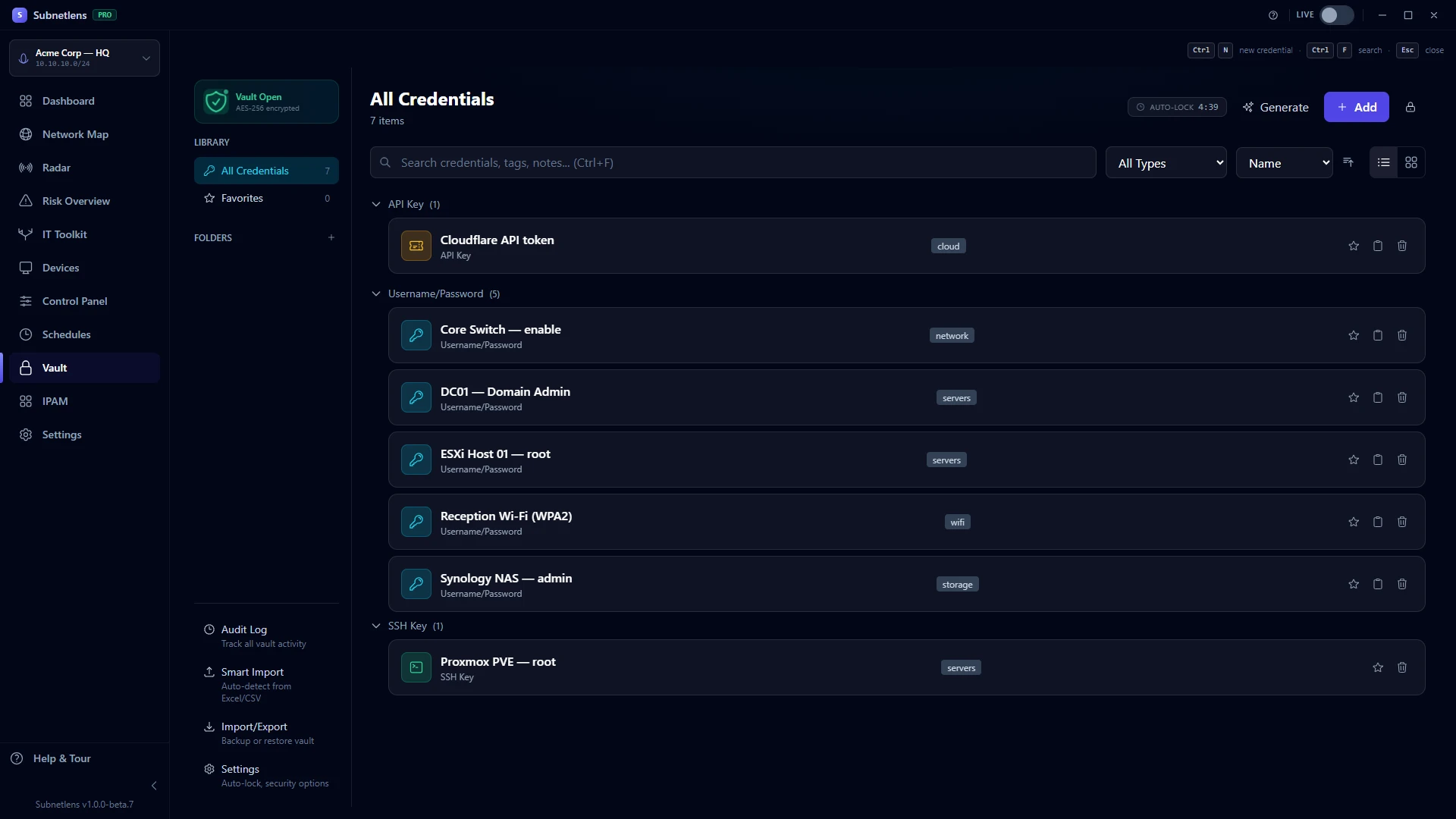
Credential Vault
AES-256-GCM encrypted local storage with PBKDF2 at 600k iterations. Smart import from KeePass / 1Password / LastPass / Bitwarden exports. Auto-fills the Control Panel's shell launchers + RDP / SSH context actions. Zero cloud sync.
in: Vault page
PRO
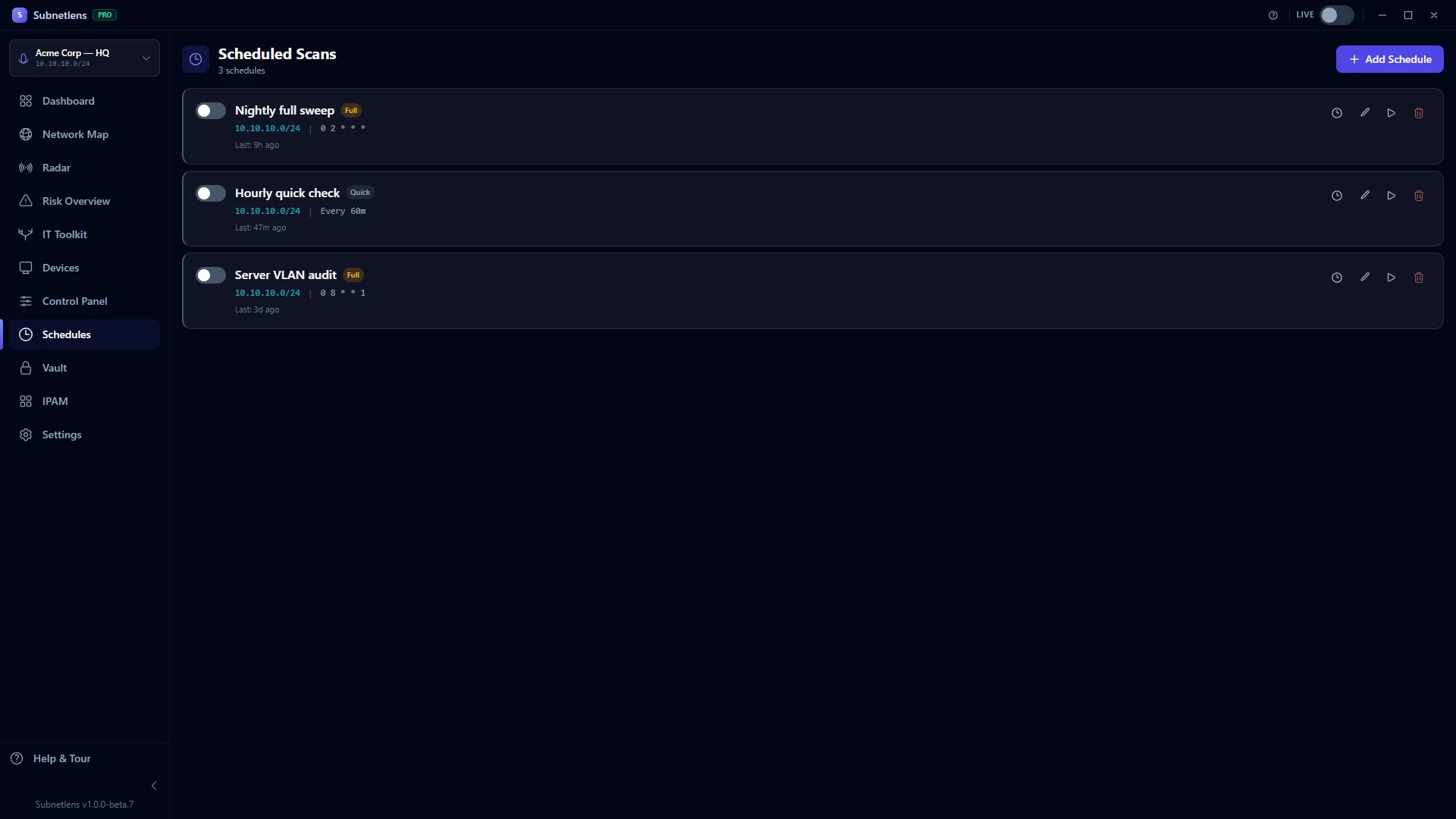
Scheduled scanning
Cron expressions or interval presets. Quick (ARP+ping) or Full (7-step) scan per schedule. Webhook integrations for Slack, Discord, Microsoft Teams or any custom URL — SSRF-hardened. Smart retries with auto-disable.
in: Schedules page
PRO
SNMP topology + Sentinel
Switch port-to-MAC mapping. Enhanced topology edges showing physical connections. Interface stats + SNMPv3 + trap receiver. Plus Sentinel — background poller watching your network while you work.
in: Map (SNMP enabled) + system tray
PRO
Prometheus exporter
Built-in /metrics HTTP endpoint plugs into your existing Grafana / Prometheus stack. Three lines in prometheus.yml and you're scraping live device counts, port stats, scan durations.
in: Settings → Prometheus
Command Palette
Ctrl+K from anywhere. Fuzzy-search every device by IP / hostname / vendor, jump to any page, run common actions — all keyboard, no mouse. The classic productivity boost, ported straight from VS Code.
in: Ctrl+K anywhere
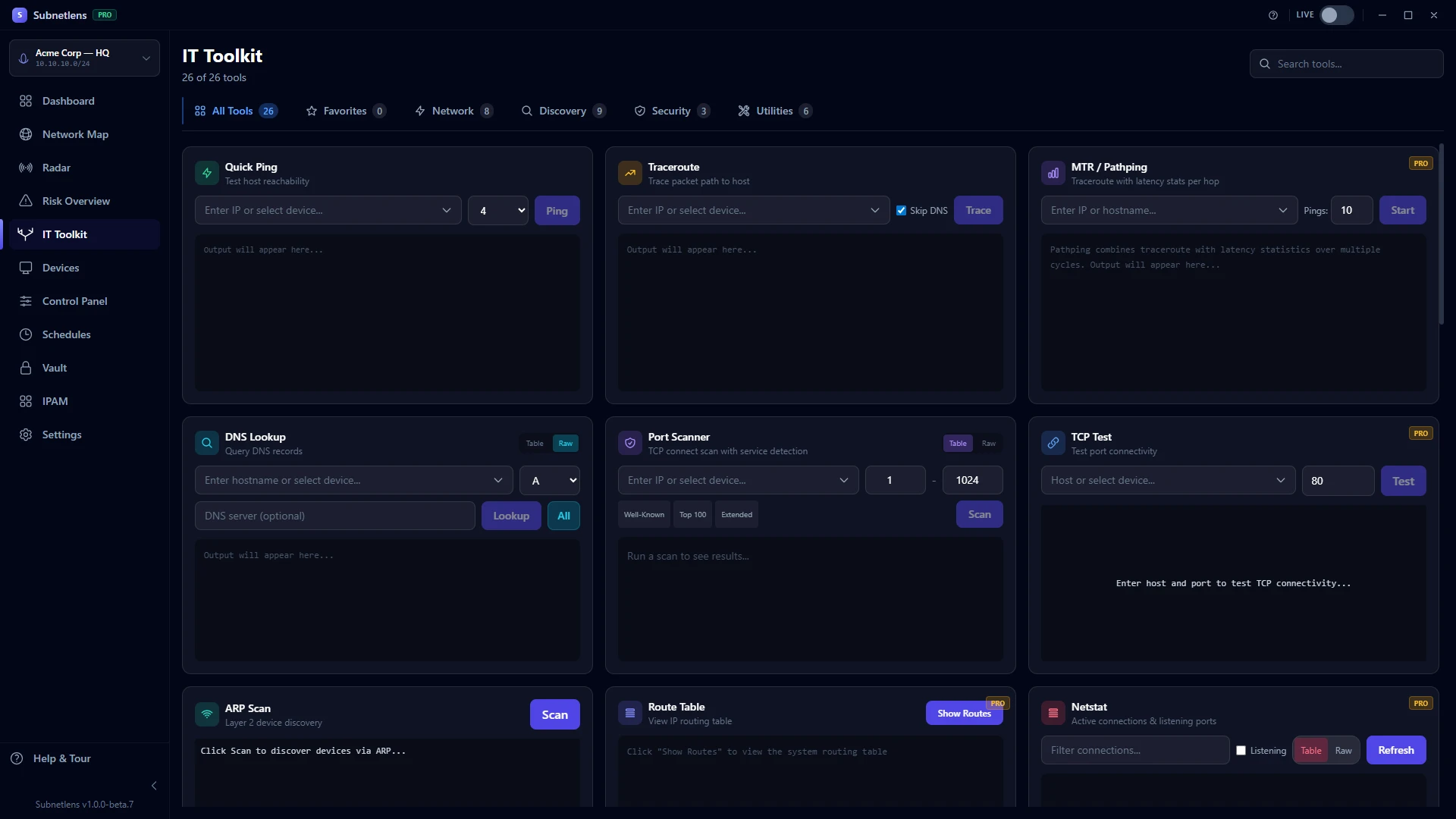
26 IT tools: 8 Free, 18 Pro
Ping, Traceroute, MTR, Port Scan, DNS, WHOIS, GeoIP, TLS Check, HTTP Headers, Cert Decoder, MAC Lookup, Subnet Calc, Hash Calc, Bandwidth, Format/Encode, Cron Tester, SMB Browser, and more — all integrated with streaming output + favourites.
in: Toolkit page (Ctrl+5)
Custom development
Need a feature we don't have, or a version of the app shaped to your workflow? For teams and MSPs we build tailored features and custom, white-label builds — Subnetlens adapts to you, not the other way around.
for: teams & MSPs
See it in action
Exactly what you'll see
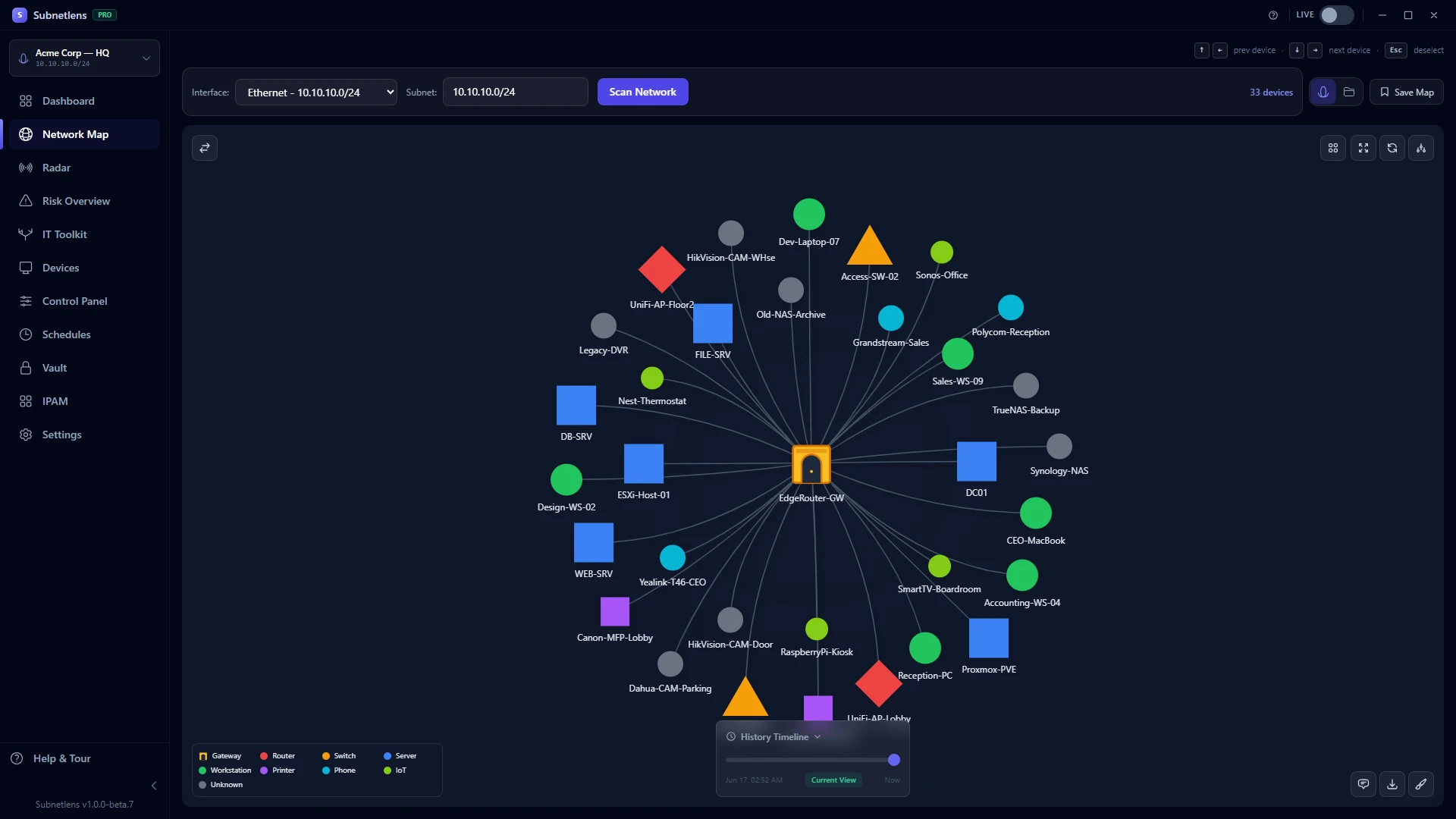
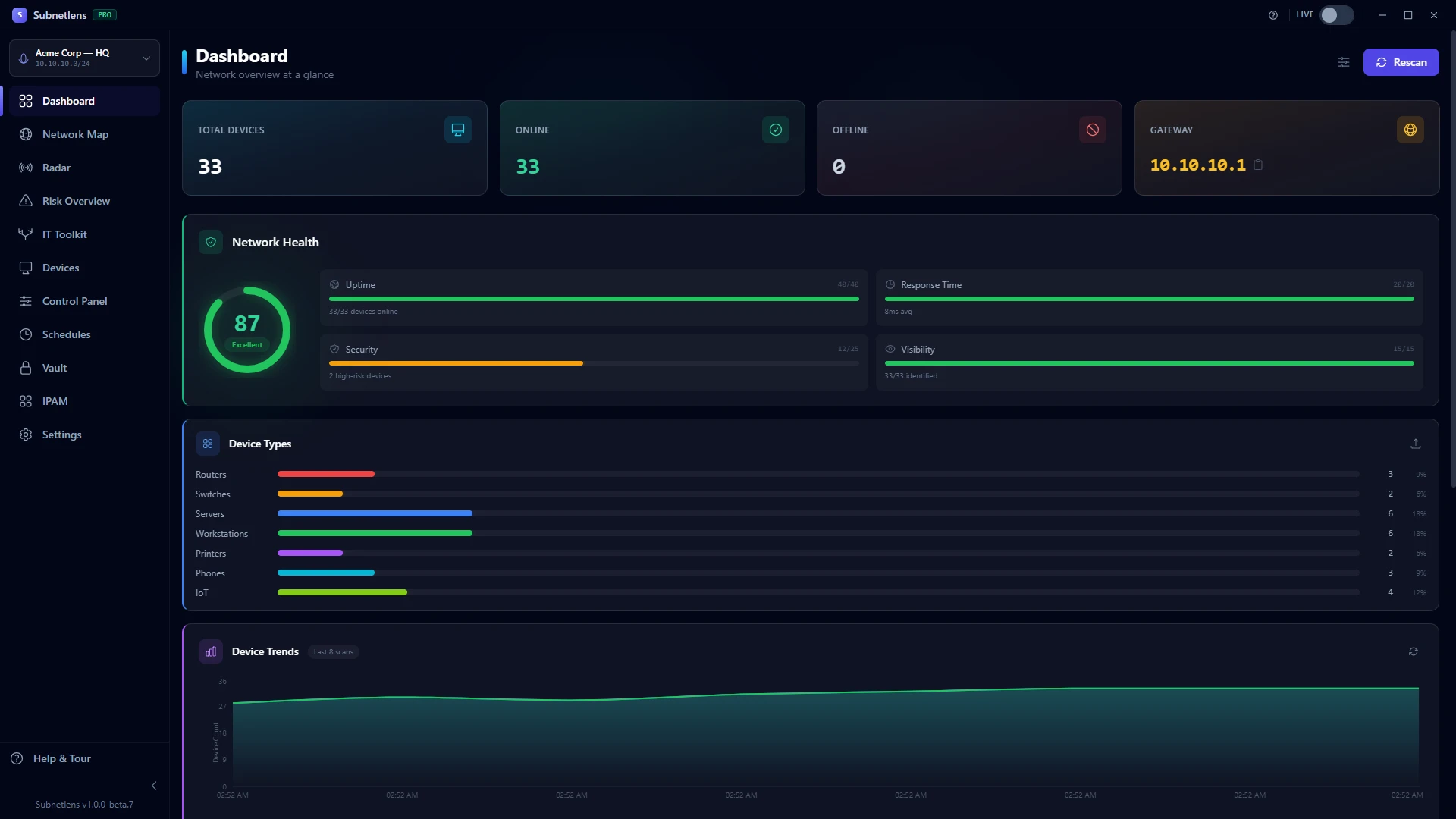
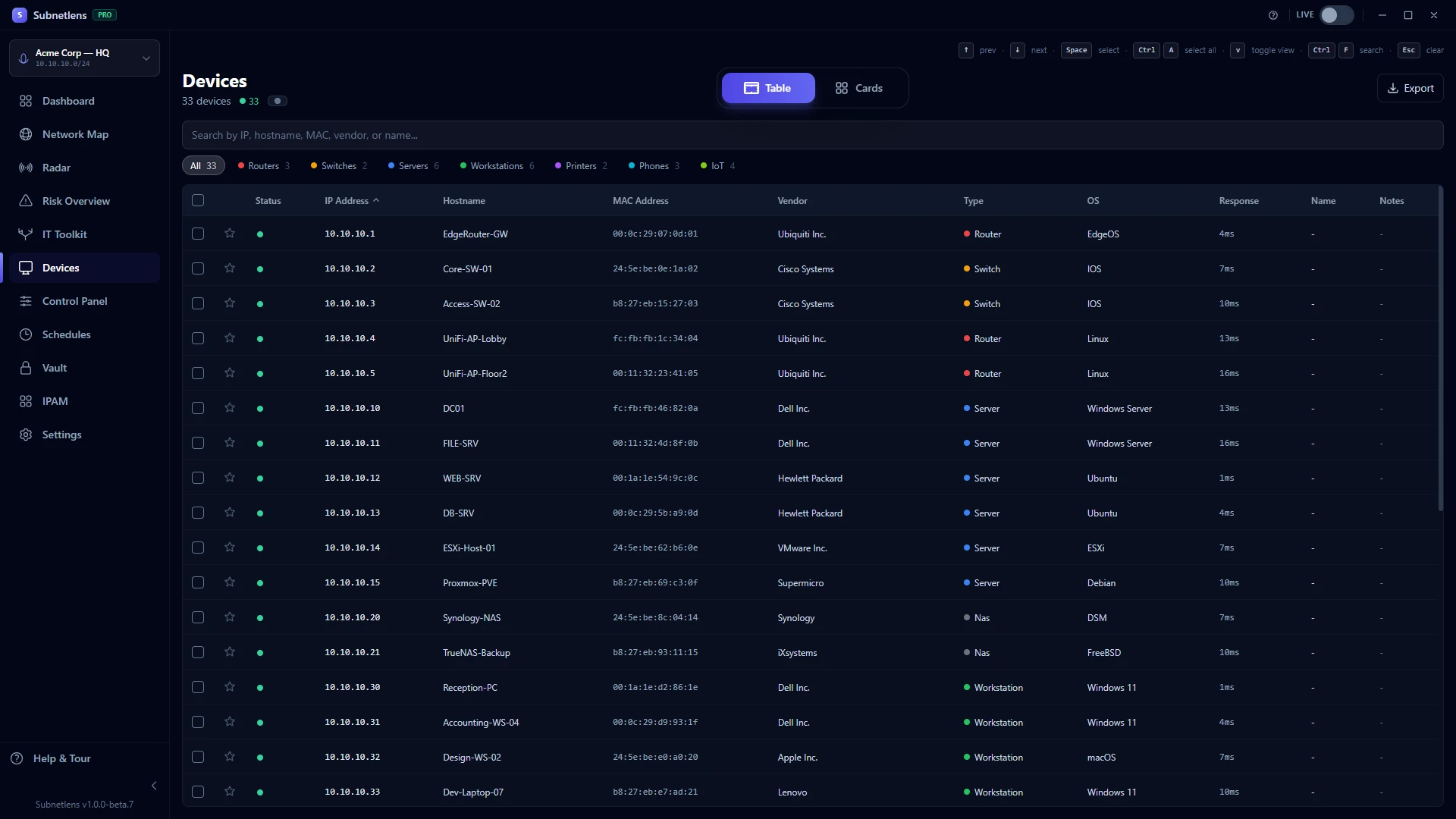
Real screenshots of Subnetlens Pro running on a sample network — every screen, just as it runs. Auto-playing, or click any tab to jump. Click a frame to enlarge it.
Subnetlens — Pro · Acme Corp HQ
Network Map
Auto-discovered topology of every device on your subnet.
▸ Auto-playing · hover to pause · click to enlarge
Video tutorial
The whole app in 11 minutes
From install and the first scan to Devices, the IT Toolkit, the free 7-day Pro trial, Radar monitoring, Control Panel, Risk Overview, IPAM and Schedules.
There are free scanners and there are enterprise platforms. Subnetlens sits exactly where most IT teams need it.
vs Free Scanners
Beyond the IP list
Advanced IP Scanner and Angry IP Scanner are great for quick scans. Subnetlens goes further with 26 tools, real-time monitoring, scheduled automation, a credential vault, and a single-device Explorer workshop — all in one app. The topology map alone replaces three separate tools. See the full Subnetlens vs Advanced IP Scanner comparison →
vs Enterprise Tools
No server. No invoice.
Enterprise monitoring platforms like SolarWinds and PRTG typically run into thousands of dollars per year and need server infrastructure and a dedicated admin to run. Subnetlens is a one-time purchase from $79, installs in under a minute, and runs entirely on the machine you already have. Zero setup. Zero server.
vs Scripts & CLI
One app, not a toolbox
Stop juggling nmap, ping, traceroute, ipconfig, and PowerShell scripts across five terminal windows. Every tool you need is one click away — with output you can read, results you can save, and devices you can target directly from the network map.
And unlike any of them: off-the-shelf tools can't change. Subnetlens can — we build custom features and tailored versions for teams & MSPs. See custom development →
Who it's for
Built for IT professionals
Whether you manage one network or fifty, Subnetlens fits your workflow without demanding a full-time operator.
MSPs managing client networks
Run scans across multiple subnets, store per-client credentials in the encrypted vault, set up scheduled monitoring for each client, and export HTML reports to share with stakeholders. All from a single laptop, no servers required.
Solo IT admins monitoring the office
Know what's on your network at a glance. Radar monitoring catches new or unauthorised devices automatically. Scheduled scans run while you sleep. One-click diagnostics let you investigate any device the moment something looks wrong.
Home lab enthusiasts
Finally see your entire homelab the way you imagined it — a proper topology map with every Pi, NAS, VM, and switch visible and labelled. Explore SNMP data, monitor for new devices, and run diagnostics without switching between five different tools.
Security teams mapping internal networks
Get a clear view of your whole subnet quickly. Spot devices with unexpected open ports, surface services you didn't know were running, prioritise what to review across your network, and document everything in a structured HTML report — all without leaving the app.
Custom development
Need it your way? We build it.
Most network tools are take-it-or-leave-it — you adapt to them, or you go without. Subnetlens is different. Need a specific feature, an integration with the systems you already run, recognition for hardware nothing else identifies, a bespoke report, or the whole app rebuilt around your workflow and your brand? We build it. You're not stuck waiting on a public roadmap — you get software shaped to your organisation.
Features built on request
Missing a report field, an export, a workflow your team lives in, or an integration with your RMM, PSA or ticketing? We scope it, quote it, and build it straight into the app — no waiting on a public roadmap.
A version shaped to you
A build tuned to your environment — your naming, your device types, your process, even recognition for proprietary or niche hardware nothing else can identify. Not a generic, one-size-fits-all tool.
White-label for MSPs
Ship a client-ready product under your own brand — your logo and colours on the app and on every report — so the deliverable looks like it's yours, because it is.
Examples of custom work
Integrations with your RMM / PSA or ticketing · recognition for proprietary hardware · bespoke reports & data exports · scheduled automation & alerting · tailored fleet deployment · and whatever your environment needs that off-the-shelf tools simply won't do.
Higher tiers include free small custom requests; larger work is scoped and quoted up front — no surprises. Tell us what you're trying to do and we'll tell you exactly what it takes.
Try Pro free for 7 days. Start it from inside the app: just your email, no card, nothing to cancel.
Pro
Everything, unlocked
One-time, perpetual license — no subscription, ever. Includes 1 year of updates. Pick the size that fits — 3 to 25 computers, or more on request — below.
Everything in Free + multiple saved profiles
All 26 diagnostic tools
Radar real-time monitoring + Live Mode
Control Panel + single-device Explorer
Encrypted credential vault (AES-256-GCM)
Scheduled scans (cron + interval) + webhooks
Deep scans + device insights
SNMP v3 + topology + Sentinel
IPAM, Port Watch, port history, Prometheus, embedded terminal
Works on 3 to 25 computers — choose your size below
Every size is a one-time, perpetual purchase — no subscription. The more computers you cover, the less you pay per computer. Pick the size that fits your setup.
Launch pricing
We are new and still earning your trust, so early users get Subnetlens Pro at a lower price. Buy now and your one-time price is locked in forever, even after list prices apply on March 1, 2027.
We build tailored features and custom versions of Subnetlens to fit your organisation — and handle deployments beyond 25 computers. Tell us what you need.
Every license is one-time and perpetual — no subscription. A "small custom request" is a minor tweak or small feature (a few hours of work); anything larger is quoted separately. Need to pay by invoice or PO? Contact us. Need more than 25 computers? Get in touch.
Full feature breakdown
Feature
Free
Pro (from $79)
CIDR/range scanning (7-step pipeline)
✓ One saved profile
✓ Multiple saved profiles
Interactive network map
✓
✓
Device classifier — 1,451 hostname patterns
✓
✓
IT Toolkit
✓ 8 essential tools
✓ All 26 tools
Device inventory (table & card view)
✓
✓
Dashboard & scan history
✓
✓
Command Palette (Ctrl+K)
✓
✓
Embedded terminal
—
✓PRO
Radar real-time monitoring + Live Mode
—
✓PRO
Control Panel + single-device Explorer
—
✓PRO
Per-device port history
—
✓PRO
Port Watch: extra ports checked on every scan, per device or network-wide
—
✓PRO
Scheduled scans (cron / interval)
—
✓PRO
Encrypted credential vault
—
✓PRO
Deep scans + device insights
—
✓PRO
SNMP v1/v2c/v3 + topology + Sentinel
—
✓PRO
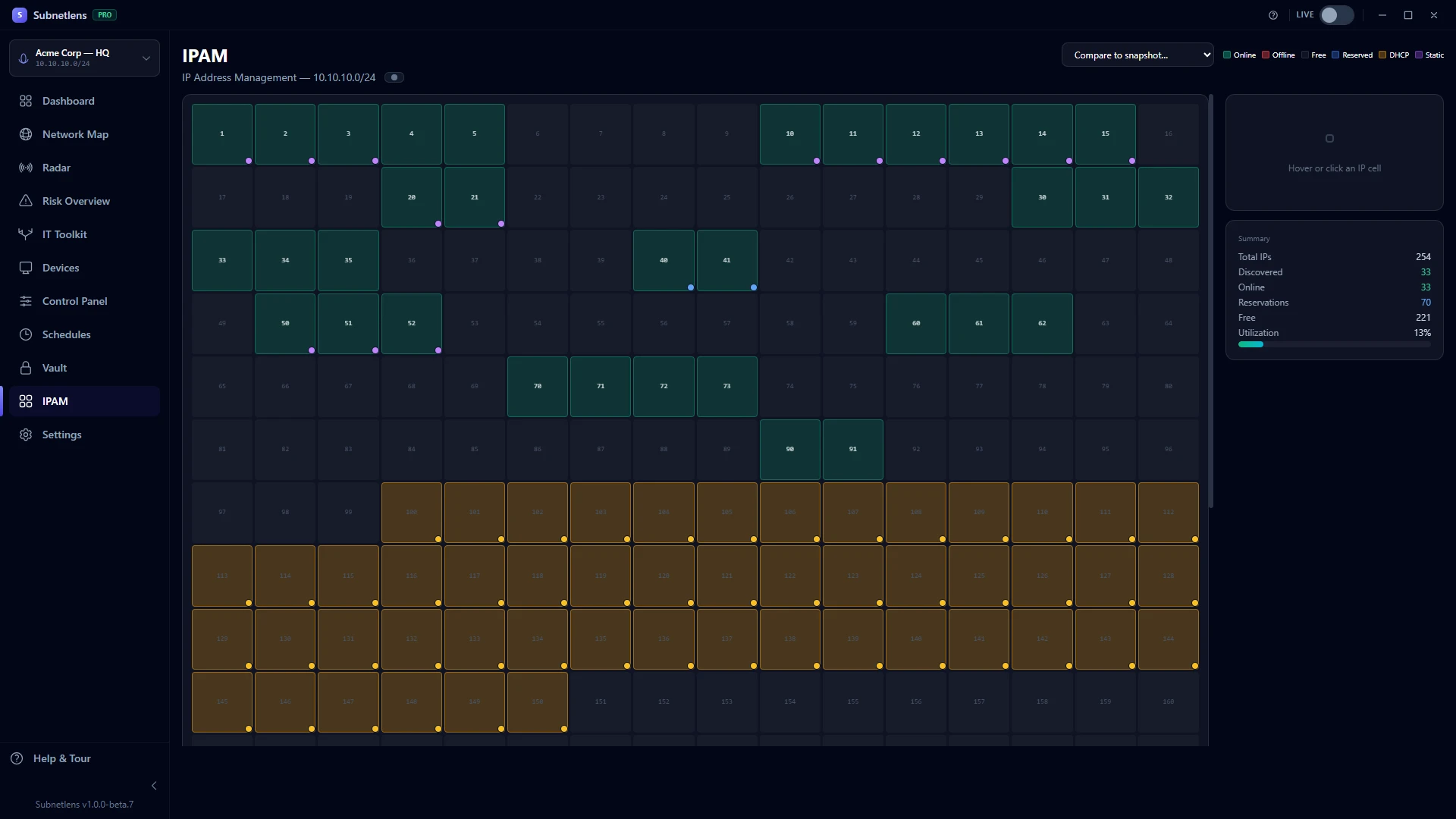
IPAM — IP address management
—
✓PRO
HTML reports & CSV/JSON export
—
✓PRO
Webhook integrations (Slack/Discord/Teams)
—
✓PRO
Prometheus exporter
—
✓PRO
Computers per license
✓ Any (no key needed)
✓ 3–25 computers (by license size)
Updates included
Ongoing (free tier)
1 year of updates included
FAQ
Frequently asked questions
Is the Pro license really a one-time payment? No subscriptions?
Yes. Every Pro license — from the $79 Personal license up to the $399 Business license — is perpetual: you own it, with no subscription and no recurring charge. Each one includes 1 year of updates from the date of purchase. After that, you keep using the version you have for as long as you like — no feature lock-out, ever.
Is there a free trial?
Yes — a 7-day free trial of the full Pro tier. Start it from inside the app: download Subnetlens, open the app, hit "Try Pro free for 7 days" and enter your email. No card details, nothing to cancel — when the 7 days end, the app simply returns to the free tier and everything you scanned stays on your machine. One trial per machine.
Can you build custom features or a custom version for us?
Yes — it's one of the things that sets us apart. For teams and MSPs we build tailored features and custom, white-label versions of Subnetlens to fit your workflow. Higher tiers include a few free small custom requests (a minor tweak or small feature); larger work is scoped and quoted up front. Get in touch and tell us what you need.
Does it work completely offline? Is an internet connection required?
Subnetlens is a locally installed desktop application. All scanning, monitoring, and data storage happens on your machine. The bundled 1,451-pattern device database is part of the installer — nothing is fetched live. License activation requires a one-time internet connection, after which the license is cached locally with a 7-day offline grace period for re-validation.
How many computers can I use one Pro license on?
That depends on the license size you buy — from 3 computers (Personal, $79) up to 25 (Business, $399). Need more than 25? Get in touch for a custom quote. Whichever size you choose, you can move an activation between machines: open Settings → License, deactivate one computer, and activate the new one. If you ever get stuck — a hardware change, a reinstall, anything — email support@subnetlens.com and we'll sort it out for you.
Is any of my network data sent to your servers?
No. All scan results, device data, credentials, and network maps remain exclusively on your machine. The only external communication is license activation and validation (license key + a non-identifying machine fingerprint). We never receive your IP addresses, device inventories, or any network data. Zero telemetry by design.
What's the device classifier and how does the 1,451-pattern database work?
Every device gets typed (router / server / workstation / phone / printer / NAS / IoT / camera / etc.) via a 14-signal classifier — ports, MAC vendor, hostname patterns, HTTP/SSH banners, mDNS/SSDP services, DHCP fingerprints, TTL, port-count, and more. Hostnames get cross-checked against a hand-curated 1,451-pattern database covering 13 categories: Apple, Samsung, Xiaomi, Google, Microsoft, routers (TP-Link/Netgear/AVM/etc.), printers, IP cameras (Hikvision/Reolink/Wyze/Ring/Nest), NAS (Synology/QNAP), smart-home (Sonos/Echo/Hue), enterprise gear (Ubiquiti/Meraki/Aruba), smart TVs and gaming. When a DEFINITIVE pattern matches AND the MAC vendor agrees, classification locks at 0.95 confidence. All offline. The 1,451 patterns ship in the installer and update with releases — no auto-update or cloud sync needed.
Is this Windows only? What about macOS or Linux?
Currently Windows only (Windows 10 and 11, 64-bit). Several core features rely on Windows-native commands (ARP, netstat, route tables, NetBIOS resolution, SMB) which makes a direct macOS/Linux port non-trivial. Cross-platform support is under evaluation for a future version. If this is important to you, let us know — the more demand we see, the higher the priority.
What networks can I scan with this tool?
Any network you are authorised to scan. Subnetlens is designed for IT professionals to scan and manage networks they own or are employed to administer. Scanning networks without authorisation is illegal and against our EULA. The tool is designed for local network administration — home networks, office LANs, and client networks under your management.
Do I need administrator privileges to run it?
Administrator privileges are recommended for full functionality. ARP table reading and certain low-level network operations work best with elevated access. The app will run without admin rights, but some scan steps (particularly ARP-based discovery) may return fewer results on tightly locked-down environments.
What's the current state of the product — beta, release, what?
Subnetlens 1.0.0 is a full release: every feature on this page is finished and tested, and the public beta programme that shaped it is complete. It's fully usable today: the free tier is free forever, and Pro unlocks everything for a one-time purchase from $79 (licenses cover 3 to 25 computers — see Pricing), no subscription.
How does this compare to Advanced IP Scanner or Angry IP Scanner?
Advanced IP Scanner and Angry IP Scanner are excellent at what they do — producing a list of discovered IPs. Subnetlens does that too, and then keeps going: 1,451-pattern device recognition, topology visualisation, real-time monitoring, 26 built-in tools, credential vault, scheduled automation, risk scoring, single-device Explorer workshop, SNMP topology, and a Pro-grade Control Panel. The difference between an IP scanner and a complete network management workbench. Full breakdowns: vs Advanced IP Scanner, vs Angry IP Scanner, vs Fing Desktop.
Is Subnetlens related to the open-source subnetlens CLI on GitHub?
No. Subnetlens (subnetlens.com) is an independent, code-signed Windows desktop application by HELIOSOFT LTD, a UK-registered company. It is not affiliated with open-source command-line projects that happen to share the name. If you are looking for the Windows network scanner with the topology map, device classification, and one-time Pro licenses, you are in the right place.
Is Subnetlens free?
The free tier is free forever: single-subnet scanning, the interactive network map, device classification, and 8 essential tools, no account required. Pro unlocks everything else with a one-time purchase from $79 (no subscription), and every machine can start a 7-day Pro trial with just an email, no card.
Is Subnetlens safe to install?
Yes. Every installer is code-signed by HELIOSOFT LTD via Azure Trusted Signing, the download page publishes the SHA-256 checksum so you can verify your copy, and the current release shows 0 detections across 53 antivirus engines on VirusTotal (July 2026). One honest note: behaviour-based shields in a few antivirus products (notably Avast and AVG) sometimes flag network scanners as a category, including well-known tools like Advanced IP Scanner. That is a false positive: your scan data never leaves your machine, and we submit our releases to AV vendors' whitelisting programs to clear these. Full details, including per-vendor whitelisting status →
Stop paying monthly for network monitoring
Your network, fully visible. Pay once. Own it forever.
Download free and scan your network in minutes. When you need the advanced features — Radar, Control Panel + Explorer, vault, all 26 tools — Pro is a one-time purchase from $79 — pick the license size you need. No subscription. No renewal required to keep using it.